

Prerequisites
- Codex CLI installed:
npm install -g @openai/codex - A Flatkey account with an API key — get one here
Configuration
Set the following environment variables before running Codex CLI:~/.bashrc, ~/.zshrc) to make the setting permanent:
~/.zshrc
Configure with CC Switch
CC Switch is a third-party desktop configuration manager for coding assistants. It is not a Flatkey product, and Flatkey is not a built-in preset. The steps below follow the current CC Switch interface. The manualOPENAI_BASE_URL and OPENAI_API_KEY method above and CC Switch are alternative ways to configure Codex. For a clear CC Switch test, unset only stale OPENAI_BASE_URL or OPENAI_API_KEY values that point to another provider or key. Values inherited by your shell can override or conflict with the provider you activate in CC Switch.
1. Install CC Switch
Download CC Switch from ccswitch.io or its official GitHub repository. Install it for your operating system, then open the app.2. Open the Codex provider panel
Select Codex in CC Switch. This opens the provider panel that controls the configuration used by new Codex sessions.
3. Add Flatkey as a custom provider
Choose Custom Provider and add a provider with these values: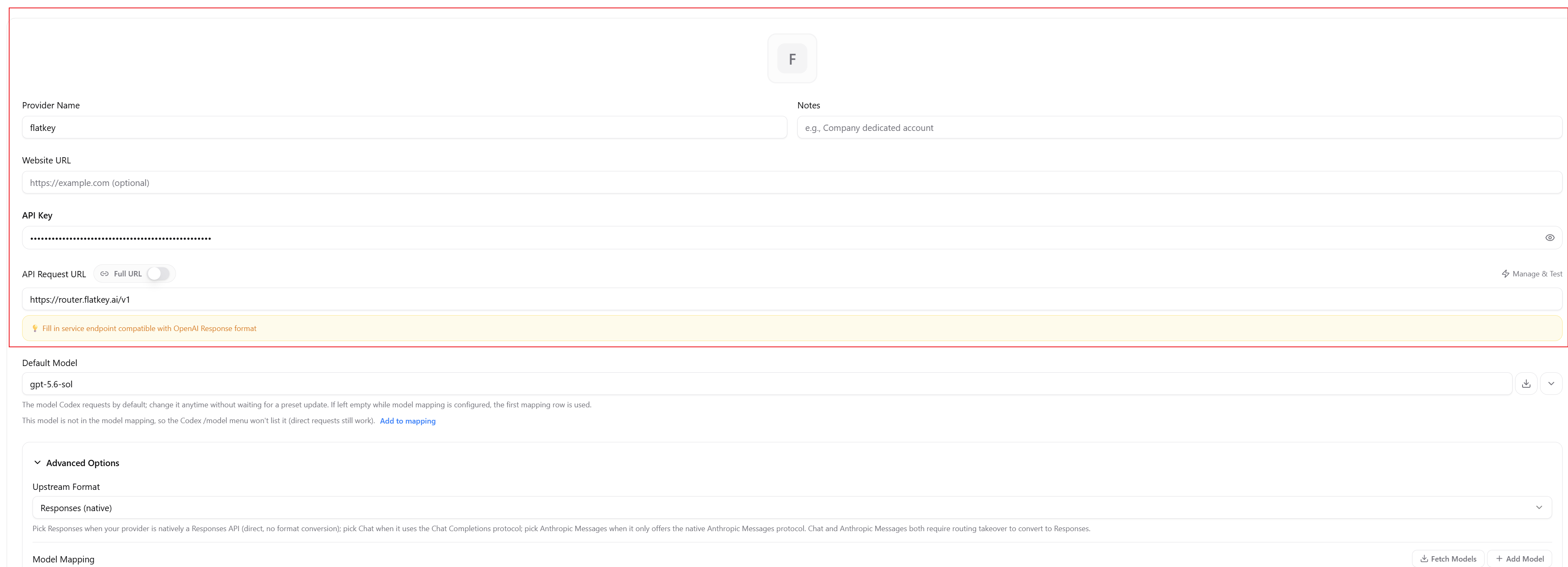
4. Configure the model
Find Flatkey in the Codex provider panel in CC Switch, then click Edit. To change the model used by new Codex sessions, set Default Model to an exact model ID from the Flatkey Model Directory. Do not use a display name or guess an ID. For example, you can enter any of these text-generation models in the CC Switch Default Model field:/model menu, use Model Mapping:
- Click Fetch Models to load available models from Flatkey. If the model you need is missing, click Add Model.
- Edit the mapping’s Menu Display Name. This is the label shown in the
/modelmenu. - Set Actual Request Model to the exact ID from the model directory, such as
claude-sonnet-4-6orgemini-2.5-flash. Codex sends this ID in requests, not the menu label.
/model menu entry and its corresponding request ID. It does not make an incompatible model work with Codex. After changing a mapping, follow the steps below to save the provider and restart Codex before the updated model list takes effect.
After you save and activate Flatkey, new Codex sessions use the Default Model set in CC Switch. To override it for one command only, pass the same exact ID:

5. Save and activate Flatkey
Save the provider, then activate Flatkey in the Codex provider panel. Confirm that Flatkey is the active provider before you start Codex.
6. Restart and verify
Exit the existing Codex session and end its process. Close the specific terminal window or tab that ran Codex, not unrelated terminals. Open a fresh terminal that does not inherit stale relevantOPENAI_BASE_URL or OPENAI_API_KEY values. Move to a small or empty directory and start a new Codex session. Enter /model, confirm that the model you added or edited appears, and select the model you want to use. Then send a minimal request.

An agent request can include system prompts, tool definitions, conversation history, files, and command results. Use a small context for connectivity checks so the token count and cost stay easy to inspect.
Switch back to another provider
Open the Codex provider panel in CC Switch, select the provider you want, and activate it. End existing Codex sessions and processes, then open a fresh terminal that does not inherit stale relevantOPENAI_BASE_URL or OPENAI_API_KEY values. Start a new session.
Troubleshooting CC Switch
Running Codex CLI
Once the environment variables are set, use Codex normally:Verify the manual environment-variable setup
This section applies only to the manualOPENAI_BASE_URL and OPENAI_API_KEY method. If you configured Codex with CC Switch, follow Restart and verify above instead. For the manual method, run a Codex command and check Usage Logs. You should see the request logged with the model and token counts. If no request appears, confirm both variables are set correctly in the current shell session.
Troubleshoot the manual environment-variable setup
The table below applies only to the manualOPENAI_BASE_URL and OPENAI_API_KEY method. If you configured Codex with CC Switch, use Troubleshooting CC Switch above.